Showing posts with label Taskbar. Show all posts

Thursday, December 17, 2015

How to customize taskbar and start menu?

Do you want to keep Taskbar and Start Menu in your own design.From this you can able to put your Desktop taskbar from right to left and up and down any where you want and also you can able to change the size of the taskbar.Not only this you can also able to hide the taskbar and when you put mouse cursor than it will automatically appears. Now lest follow this steps to do this.
1.First of all Click on Start icon and Search Taskbar or right click on desktop and click on properties and open for example see below picture.


2.After opening that now start your work see I have putted my taskbar at the top of the
Desktop


3. After customizing Taskbar and Start Menu click on apply and then OK.

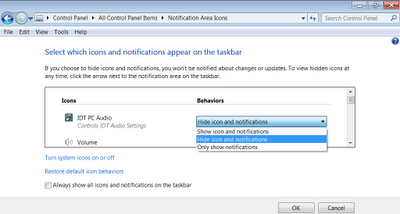
How to hide or show notification area winodws taskbar

Notification area icon hiden or show how to do so from your Desktop to Taskbar

Notifications area icons show prosperity in your Taskbar icon image you can see here to see the full size photo Click photo to this


1. First, from your Desktop "Start / Control panel / Notification area icon "or directly from click on the Start button, click on your Desktop Notification Area icons on the Search bar, type the views Open in a program file

2. Now you can start your work in text, means Notification Area icons show or hide the Taskbar area icons Enjoy it.