Facebook is a top and famous social media site created by the Mark Zuckerberg in August 2004. According to the visitors facebook is in 2nd place after Google.

Since, 2004 users are increasing day by day. Facebook not only provide the facility to stay connected with friends and family from all over the globe it is also a great platform on the internet from Marketing, Business, Traffic etc. This is all because of millions of active users on Facebook. They are active because facebook is providing the new features time by time which attracts the users. So, there are millions of active users in Facebook at a single place So, why don't you take advantage of this to drive lots of traffic in your Website or Blog. So, in this article I will so you how you can drive lots of traffic from facebook for your website or Blog. So, follow given steps bellow.
1. Create a Facebook fan page and complete the profile.
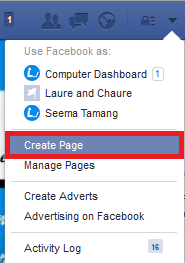
This is first and most important part to drive a traffic. Because if you have a product than here you can promote here. After promoting audience will see and take action of your product. Not only this you can also share you post link here which increase the traffic when some one of your audience like and click on the link. So, to this first create a page complete the page profile like profile picture, cover picture, contact, about and other required things which helps the user to know about your business.
Similarly complete your own profile picture like your study, about your business, working at which helps your friends to know about you and the user who is not following you also get the information about you.
2. Make friends and invite to like you page.
If you want to increase like to your page than you have to make lots of friends. To do this use facebook search type the name of the user and send friend request.

And one more thing send friend request to those people whom you personally know. If you continually send friend request to unknown people than you may block. If your friend request is accepted invite your friends to like your page. It is not sure that all of your friend will like your page but may be 10% of your friend will like. This is only for initial stage. Once other user visit your site and like your post and article than they will automatically follow you on facebook from your site.
If you want to make 5000 friends within a week than click here and follow the guide.
3. Became a fan of others

In the initial stage no one know you. If you want to get more popularity than start following others which gives a good fan following. After that start liking other fan page in return ask him to like your page if they don't don't force him to like your page. So, once you have a good follower than you will get popularity and you will get lots of traffic to your site.
4. Join facebook Groups

This is the best place in the facebook from where you can get lots of traffic. Join the group which match you niche and start posting your article and link mange time and keep posting your old post also. When some one of the group read your post than he/she will click on the post link which drive them to your site. Don't post nonsense things use the group legally otherwise you will get banned. According to my experience join more than 1 group and post same article in different group for better result. So, join different group to promote your post and article in different community.
5. Link other social account to Facebook page and profile.

This is a very smart way to increase engagement of your followers. That means spend a little time and add other social account link to you Facebook profile and page. Add famous social account link like RSS feed, Twitter etc. This helps your followers to stay up to date with your latest post or activities on other social sites.
6. Be active and helps other.

Be active it doesn't mean to stay 24 hour online. Spend some time and engaged your self with other. Like and comment on your friends status, pictures, Group post , Page post and share. It is not complusory to do this thing to all pages and friends post but for few you can you do. In this way you can create a good relationship with them. In return may be they will also like, comment and share your post. Not 100% sure it will increase your traffic in high amount. At least a little will increase.
7. Interact with the followers

This is a very good way to make a good relationship with the followers and drive traffic. For example if some one either like, comment and share your post and ask some question regarding your post than give them a good response. You just show your gratitude towards that. If some is liked and share your post say them thanks. If some one is comment in your post reply them in a positive way and mention the name of the person on the comment. This helps you to drive lots traffic in your blog or site.
8. Promote your Facebook Page link.

Take your facebook page with the
people to do this follow bellow 3 steps.
1. Add a facebook like box in your blog or website sidebar. When some one visit your site and found interesting on your article and want to like your future updates than they will directly like from your site or blog.
2. When you open your Facebook page you will see a share option on the cover picture of you page so keep sharing your page within the friends and also ask them to share.
3. When you open our Facebook page you will see a option called connect to twitter. When you connect you fan page to twitter.Once when you share something to your facebook fan page it will automatically shared to your twitter account too. This helps you to save time.
9. Use Facebook Ads
 This is not the important if you want to promote your post than you can use facebook ads plan with little investment to promote your post to large audience all over the facebook. For example you have written a nice post a published a E-Book, with your little investment to Facebook ads plan you can promote these and it will directly give you benefit with better result.
Notice: Facebook Advertising is very cheap than any other advertising network.
Since, 2004 users are increasing day by day. Facebook not only provide the facility to stay connected with friends and family from all over the globe it is also a great platform on the internet from Marketing, Business, Traffic etc. This is all because of millions of active users on Facebook. They are active because facebook is providing the new features time by time which attracts the users. So, there are millions of active users in Facebook at a single place So, why don't you take advantage of this to drive lots of traffic in your Website or Blog. So, in this article I will so you how you can drive lots of traffic from facebook for your website or Blog. So, follow given steps bellow.
1. Create a Facebook fan page and complete the profile.
This is first and most important part to drive a traffic. Because if you have a product than here you can promote here. After promoting audience will see and take action of your product. Not only this you can also share you post link here which increase the traffic when some one of your audience like and click on the link. So, to this first create a page complete the page profile like profile picture, cover picture, contact, about and other required things which helps the user to know about your business.
Similarly complete your own profile picture like your study, about your business, working at which helps your friends to know about you and the user who is not following you also get the information about you.
2. Make friends and invite to like you page.
If you want to increase like to your page than you have to make lots of friends. To do this use facebook search type the name of the user and send friend request.
And one more thing send friend request to those people whom you personally know. If you continually send friend request to unknown people than you may block. If your friend request is accepted invite your friends to like your page. It is not sure that all of your friend will like your page but may be 10% of your friend will like. This is only for initial stage. Once other user visit your site and like your post and article than they will automatically follow you on facebook from your site.
If you want to make 5000 friends within a week than click here and follow the guide.
3. Became a fan of others
In the initial stage no one know you. If you want to get more popularity than start following others which gives a good fan following. After that start liking other fan page in return ask him to like your page if they don't don't force him to like your page. So, once you have a good follower than you will get popularity and you will get lots of traffic to your site.
4. Join facebook Groups
This is the best place in the facebook from where you can get lots of traffic. Join the group which match you niche and start posting your article and link mange time and keep posting your old post also. When some one of the group read your post than he/she will click on the post link which drive them to your site. Don't post nonsense things use the group legally otherwise you will get banned. According to my experience join more than 1 group and post same article in different group for better result. So, join different group to promote your post and article in different community.
5. Link other social account to Facebook page and profile.
This is a very smart way to increase engagement of your followers. That means spend a little time and add other social account link to you Facebook profile and page. Add famous social account link like RSS feed, Twitter etc. This helps your followers to stay up to date with your latest post or activities on other social sites.
6. Be active and helps other.
Be active it doesn't mean to stay 24 hour online. Spend some time and engaged your self with other. Like and comment on your friends status, pictures, Group post , Page post and share. It is not complusory to do this thing to all pages and friends post but for few you can you do. In this way you can create a good relationship with them. In return may be they will also like, comment and share your post. Not 100% sure it will increase your traffic in high amount. At least a little will increase.
7. Interact with the followers
This is a very good way to make a good relationship with the followers and drive traffic. For example if some one either like, comment and share your post and ask some question regarding your post than give them a good response. You just show your gratitude towards that. If some is liked and share your post say them thanks. If some one is comment in your post reply them in a positive way and mention the name of the person on the comment. This helps you to drive lots traffic in your blog or site.
8. Promote your Facebook Page link.
Take your facebook page with the
people to do this follow bellow 3 steps.
1. Add a facebook like box in your blog or website sidebar. When some one visit your site and found interesting on your article and want to like your future updates than they will directly like from your site or blog.
2. When you open your Facebook page you will see a share option on the cover picture of you page so keep sharing your page within the friends and also ask them to share.
3. When you open our Facebook page you will see a option called connect to twitter. When you connect you fan page to twitter.Once when you share something to your facebook fan page it will automatically shared to your twitter account too. This helps you to save time.
9. Use Facebook Ads
Notice: Facebook Advertising is very cheap than any other advertising network.


