Friday, December 18, 2015

How to create new document ms office excel

Microsoft Excel is one of the most popular spreadsheet applications that helps you
manage data, create visually persuasive charts, and thought‐provoking graphs. Excel
is supported by both Mac and PC platforms. Microsoft Excel can also be used to
balance a checkbook, create an expense report, build formulas, and edit them.

OPENING MICROSOFT EXCEL ON A PC

1. To begin Microsoft Excel, Go to Start > All Programs > Applications > Microsoft
Office > Microsoft Excel

2. When opened a new spreadsheet will pop up
on the screen, if this does not happen click on the Office Icon > New. From here
a dialog box with various different templates will appear on the screen that you can
choose from. Once a template is chosen, click Create.

Most reliable method to search application program.

Most Reliable method to search application programs:
  1. Click on Start button.
  2. Choose search
  3. Choose for Files and Folders and click on it; again click on All files or Folders option in case of Windows ‘XP.
Then the following dialog box will appear.
  1. Type any above required application file name at the search for files or folders (All or part of the file name) box.
  2. तपाईं हामीलाई थाहा भएकै कुरा हो की हाम्रो देश जलश्रोत मा धनी अनि Load seading.. मा भने गरीब यो एउटा ब्यक्ती को मात्र मर्म नभएर पुरा नेपाली नागरीकको लागी दुखको कुरो हो तर पनी यी अँध्यारो कुनामा बसेर उज्यालोको ज्योतीलाई पर्खीरहेका छौं थाहा छैन यो कठीन सपना कहिले सफल हुने हो त्यसैले यी सबै चक्रब्युलाई मध्यनजरमा राखेर आज हामीले आफ्नो laptop को Battery लाई सकेसम्म कसरी खपत गर्ने बिध्युत को केही ठेगान छैन कहिले आउँछ अनि कुन बेला जान्छ तर आफ्नो कम्प्युटर भने निरन्तर चलिरहन्छ र त्यसको लागी Energy power चाहीन्छ आउनुस तल केही सामान्य आठ तरीका लिएर आएको छु - See more at: http://adhikarikedar.blogspot.com/2015/09/laptop-battery-8.html#sthash.MnwHqr5h.dpuf
  3. Select My computer or Local Hard Drives from the look in dropdown menu.
  4. Click on Search now (Search) button.
Then, the icon of the selected program will display
  1. Give double click on it.
Then you will directly enter into the program.
Note: You can also run the applications by using its application file name. Start-Run-type  application file name and click on ok.

Wild Card:
            You can use the following character at the time of searching any types of unknown item inside the computer.
1.                  Question mark (?) – It represents single unknown characters.
2.                  Asterisk or Star mark (*) – It represents group of unknown characters.

Thursday, December 17, 2015

How to back up files and folders in window XP?

Note: You must have administrative rights on your computer to back files and folders.

1.     Click Start point to All Programs, point to Accessories, point toSystem tools and then click                    backup.
2      After the backup or restore wizard star, click Advanced mode.
    
      Note: If the backup and restore wizard does not start automatically,click Backup wizard on the tools                       menu to back up files

3.     Click the Backup tab.
4. Click New on the Job menu.
5.     Click to select the check boxes next to the drives that yo want to backup.
         If you want to select specific files or folders, expand the drive on which these files or folders are                      located.and then click the check boxes next to the files or folders that you want to back up.
6.      Click to select the System state check box that is located under My computer in the left pane.
7.      In the Backup destination list. click the backup destination that you want to use.
8.      If you clicked file in t previous step, type the fill path and file name to which you want to backup data n          the Backup media or file name box.
9.      Click Start Backup
10.    Under If the media already contains backups perform one of the following steps.
         # If you want to append this backup file to previous backup files. click Append this backup to the                     media..
          #If you want to overwrite previous backup files with this backup file. click Replace the data on the                   media with this backup
11.     Click Advanced.
12.     Click to select the Verify data after backup check box.
13.     In the Backup type box, click the type of backup that you want to create. You can select any of the following backup files.
           #Normal
           #Copy
           # Differential
           #Incremental
           #Daily
           when you click a backup type, a description of that backup type appears under "Description."
14.     Click OK and then click Start Backup.
15.     When the backup is complete click Close.

How to convert PDF file using microsoft office

There were many Inc. All someone I tap it from the MS Office Documents to Direct PDF Format of how the information about that , but I have the time, and going that day was a syllabus , but today I am trying to write about the beam now to make into a PDF File Online and it would not take other clutter directly from MS Office can be guided by whether MS office word, whether or Excel and English Font whether or Nepali Font Font no objection or other not only for the way to the bottom view more

First propose a small File (Software) Download the Size also really need to be looking to narrow down the huge not Download "SaveAsPDF" Click on this

Download file
Download it from the link above, even if it Click abuse
2. Afterwards, now go into the File whole Download to Computer Right Click on the "Run As Administrator ..." Click on the Install now
3. Install the edited PDF tried to propose now to MS Office Document Open or Create

4. Now fancy Document prepared by the Left Side on the "Office button" Click on the below "Save As ..." Take the Mouse pointer and Right Side in his place, the "PDF" in Click in


5. Click the PDF in there now propose edited afterwards formed there in Windows "File name: Name you want post and down" Publish "button Click on this

6. Now in your Document PDF Format has before Publish "Open File after publishing" opened at the Mark TRUE if Automatic PDF or PDF File below to narrow in Windows Explorer, go to View.

How to change name of the computer stepby step

Try to change the name of the beam is in your computer and have been unsuccessful if so, how come with advise you to change the computer name of useless down here see some riveting
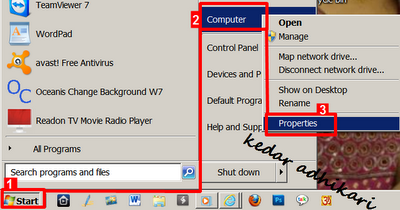
1. The first "Start" button Click on the "Computer" Right Click on the "Properties" Click on this or "Search box in the" System "type Click on the Highlight of the options in

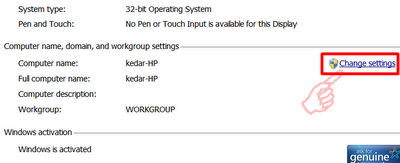
2. Afterwards, there System Windows opened and propose Mouse scroll down to see, and there is "Change settings" Click on this

3. Afterwards, there is a Popup windows opened and propose on the left side of the "Computer Name" at the bottom Click "Change ..." Click on this

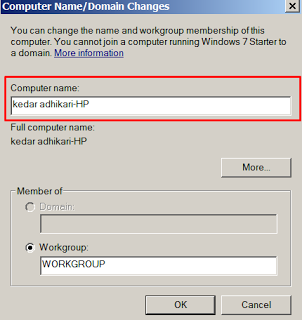
4. Now another Popup windows opened propose in "Computer name: You can write in his place, and if you committed yourself want to name the switch to the bottom" Member of: the "Workgroup:" The name you want to keep his place can also Member of: in that I have not Enable and the bottom end of the "Ok" button Click on this

Introduce how to erode well have felt this way.